AI Scribe & Commands
AI Scribe
What is Dilato's AI Scribe?
AI Scribe is a feature that allows you to record the conversation with a patient and quickly transform it into a draft clinical note. Here’s a quick guide to using it effectively.
Always get informed verbal consent from the patient before starting the recording.
How to use AI Scribe
- Open the app and navigate to the Home screen.
- Press the “New AI Scribe” button.
- Press the "Confirm patient consent and start recording" button.
- Once the conversation is complete, click “Generate note”. Dilato's AI Scribe will generate a draft note.

- Review the draft note for accuracy.
- Copy the finalized note into your EMR, just like you would with your templates.
Using AI Scribe on mobile
AI Scribe can also be used on mobile directly in your browser, without installing the Dilato app.
The workflow is similar to using it on a computer: open Dilato in your browser, start a New AI Scribe, confirm the patient’s consent, then begin recording. At the end of the consultation, press Generate note.
Notes are synced across your devices in near real time, allowing you to review the generated note on your computer.
Tips for Using AI Scribe
We have found that using these simple tips improves the accuracy of the draft notes:
Be more verbose than usual: When recording, try to speak as if you’re explaining your thought process step by step. For example:
- “I will now examine you."
- "The most likely diagnosis is a pyelonephritis."
- "Here is the plan: I’ll prescribe you rosuvastatin 10mg and do a blood test again in 3 months." Clearly dictate your findings, diagnosis, and management plan to help AI Scribe generate a thorough and precise draft note.
Try vocal commands for exams: You can try saying "Vitals, heart, lungs, abdomen normal" and the AI will attempt to write an normal physical exam based on the normal systems you mentioned. Abnormal findings you describe in the recording should also be generated.
Use generic medication names: When mentioning medications, referring to them by their generic names instead of brand names works best.
Type additional details:
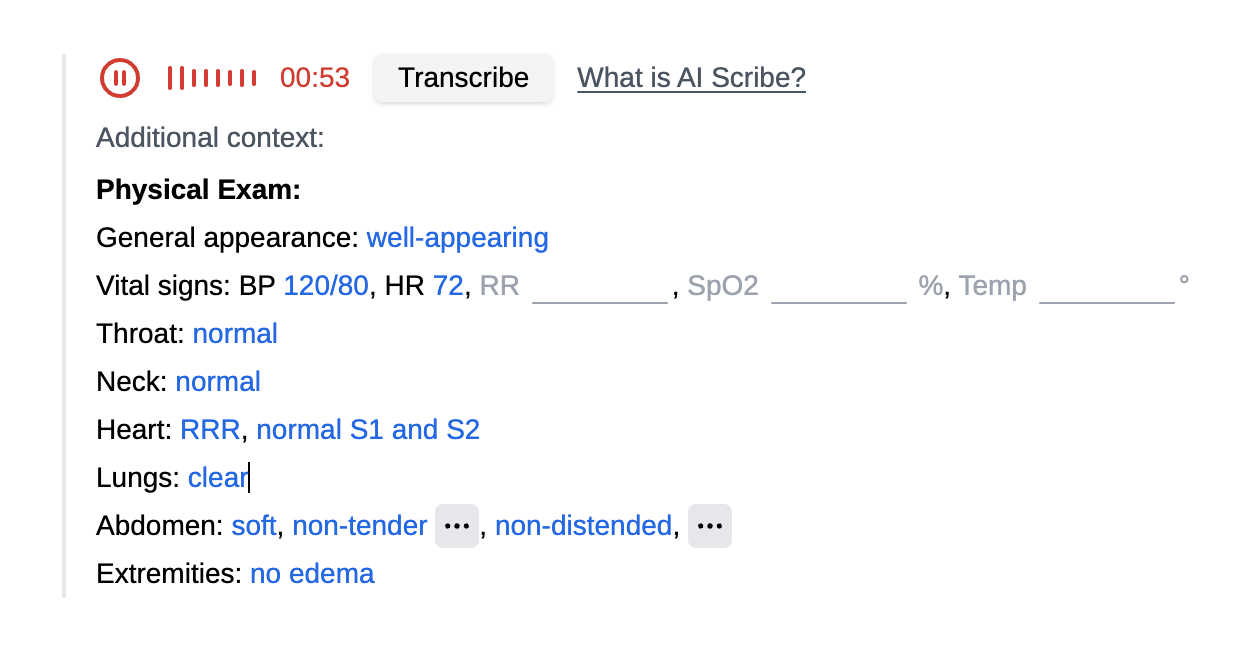 You can type in additional context that is not mentioned during the conversation, either during or after the audio recording. This context, combined with the transcription, will be used by the AI to create the final note. This feature is especially useful for the physical exam: since this field supports shortcuts, you can quickly insert your physical exam template, which will be included in the generated note.
Have suggestions for improving AI Scribe? Send us your feedback.